

TL;DR
A usable service catalog is built around services and outcomes, not internal IT structures. Keep request forms short, automate routing and approvals, and design fulfillment steps so work is repeatable and measurable.
1) Start with service outcomes, not categories
Users think in outcomes:
- “Get access to an app”
- “New laptop”
- “Reset my password”
- “Request a report”
They do not think in “network vs. systems vs. apps.”
Define your top services with:
- Service owner
- Support group
- Service hours
- Fulfillment steps
- SLA targets
2) Limit the first catalog release on purpose
The fastest path to adoption is a catalog that solves common needs.
A practical starting point:
- 10–20 high-volume requests
- 5–10 high-impact requests that create escalations when mishandled
- A clean “Something else” option with guided intake
Starter catalog ideas
| Catalog item | Best request form fields | Fulfillment notes |
|---|---|---|
| Password reset help | user, contact method, urgency | Route to identity team, auto-respond with steps |
| App access request | app name, manager, business reason | Approval + provisioning task template |
| New employee onboarding | start date, role, location, manager | Multi-task workflow with dependencies |
| Hardware request | device type, justification, delivery location | Inventory check + procurement path |
| VPN or remote access | user, device, reason, duration | Security approval + setup steps |
3) Design forms for completion, not data capture
Every field you add lowers completion and increases back-and-forth.
Rules of thumb:
- If a field isn’t used for routing, approvals, or fulfillment, remove it.
- Use conditional logic so users only see relevant questions.
- Replace free-text with small structured choices where possible.
Good form design produces better reporting later—without asking for “everything.”
4) Build fulfillment as a workflow, not a ticket
A catalog request should produce clear work:
- Create tasks for each step
- Assign each task to the right team
- Include required checklists and templates
- Make dependencies explicit
This is what makes service delivery repeatable and measurable.
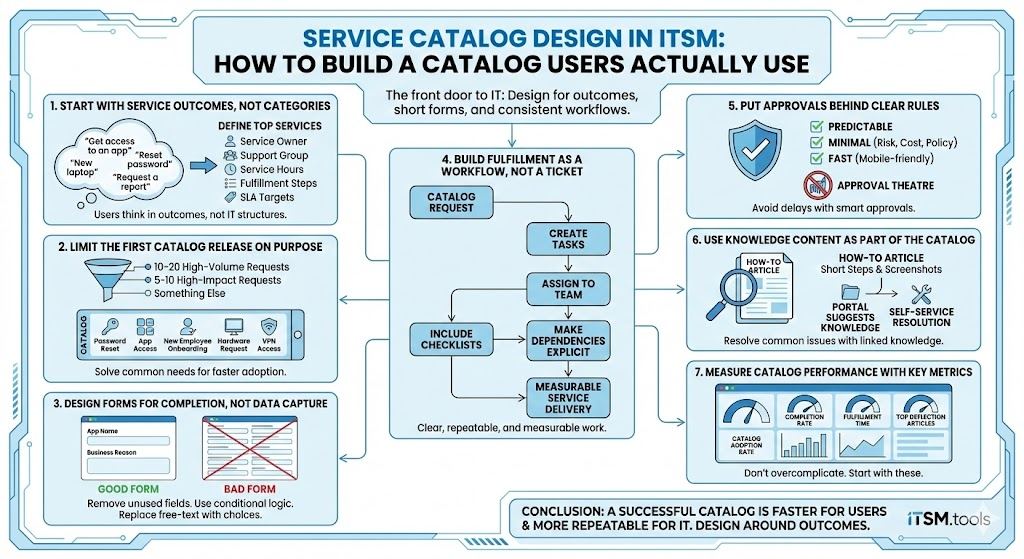
5) Put approvals behind clear rules
Approvals should be:
- Predictable: same request, same rules
- Minimal: only when risk, cost, or policy demands it
- Fast: mobile-friendly approvals reduce delays
Avoid “approval theatre” where approvals exist because “we always did it.”
6) Use knowledge content as part of the catalog
Catalog + knowledge works best when:
- Every high-volume request has a short “how to” article linked
- The portal suggests knowledge before showing the request form
- Articles are written for outcomes with short steps and screenshots where helpful
Self-service credibility improves when users can resolve common issues without opening a request.
7) Measure catalog performance with a few key metrics
Don’t overcomplicate metrics. Start with:
- Catalog adoption rate (requests through catalog vs. email)
- Completion rate (form submitted without agent follow-up)
- Fulfillment time per service
- SLA compliance by service
- Top deflection articles (knowledge views that reduce tickets)
8) Governance: keep the catalog clean over time
Catalogs degrade when everyone adds items without standards.
Set simple guardrails:
- Naming convention: outcome-focused titles
- Required owners for each catalog item
- Quarterly review for duplicates and low-usage items
- Standard templates for fulfillment workflows
FAQs
Start small. A focused launch of 10–20 items often drives higher adoption than a “complete” catalog that overwhelms users.
Usually no. Keep one catalog with clear service grouping and routing rules behind the scenes.
Forms that are too long and workflows that aren’t standardized. Users abandon the portal when it feels harder than emailing IT.
Conclusion
A service catalog is successful when it’s faster for users and more repeatable for IT. Design around outcomes, keep forms short, and make fulfillment workflows consistent.
